MotionH Soft is the clinician portal of the MotionH ecosystem.
Physiotherapists use it to prepare treatment, manage clients and
monitor progress, while clients follow their programmes in the
companion mobile app. I worked on both platforms in parallel.
Pain Points
Managing multiple clients and interconnected information without losing context.
Reducing repetitive work involved in preparing and adjusting treatment plans.
Supporting clinical decisions without replacing the physiotherapist's judgement.
Goals
Make treatment preparation and management more efficient.
Make planned and recorded progress easy to review.
Maintain consistency between the portal and the mobile app.
Approach
Structured workflows around the clinician's tasks: prepare, schedule and follow.
Extended the shared design system with desktop-specific interface patterns.
Used physiotherapist interviews and usability testing to inform design decisions.
1. Product context and scope
MotionH Clinician Software is a desktop platform used by physiotherapists
to manage clients and coordinate treatment. It provides the clinical
workspace for assessing clients, preparing treatment and reviewing
progress, while the companion mobile app enables clients to follow
their programmes and record results.
Clinicians
Primary users of the platform, using its workflows and interfaces to manage
clients and coordinate treatment.
Administrators & internal team
Using administrative interfaces and internal tools to manage the platform,
coordinate projects, assign tasks and handle support tickets.
Individual users
Accessing selected platform modules to view their exercise programmes
and follow assigned exercises.
My work covered five functional areas across 20 modules, from clinical
records and treatment planning to progress tracking, communication
and administration. My responsibilities covered product structure, workflow design, usability
improvements, interface design and the development of solutions across these different areas.
Modules
20 modules in 5 functional areas
Patient / clinical record
5 modules
Client managementAssessment Catalog+3 more
Program authoring
5 modules
Workout BuilderPlan Builder+3 more
Goals & tracking
4 modules
Goal ListCalendar+2 more
Communication
2 modules
Inbox WorkspaceConnections
Finance & admin
4 modules
BillingSupport Tickets+2 more
Product structure
The clinical modules support different responsibilities but are not
independent tools. Client information, assessment results, treatment
plans and recorded outcomes need to remain connected throughout
the treatment process. Administrative interfaces extend the platform
beyond the clinical workspace.
Clinical workflow
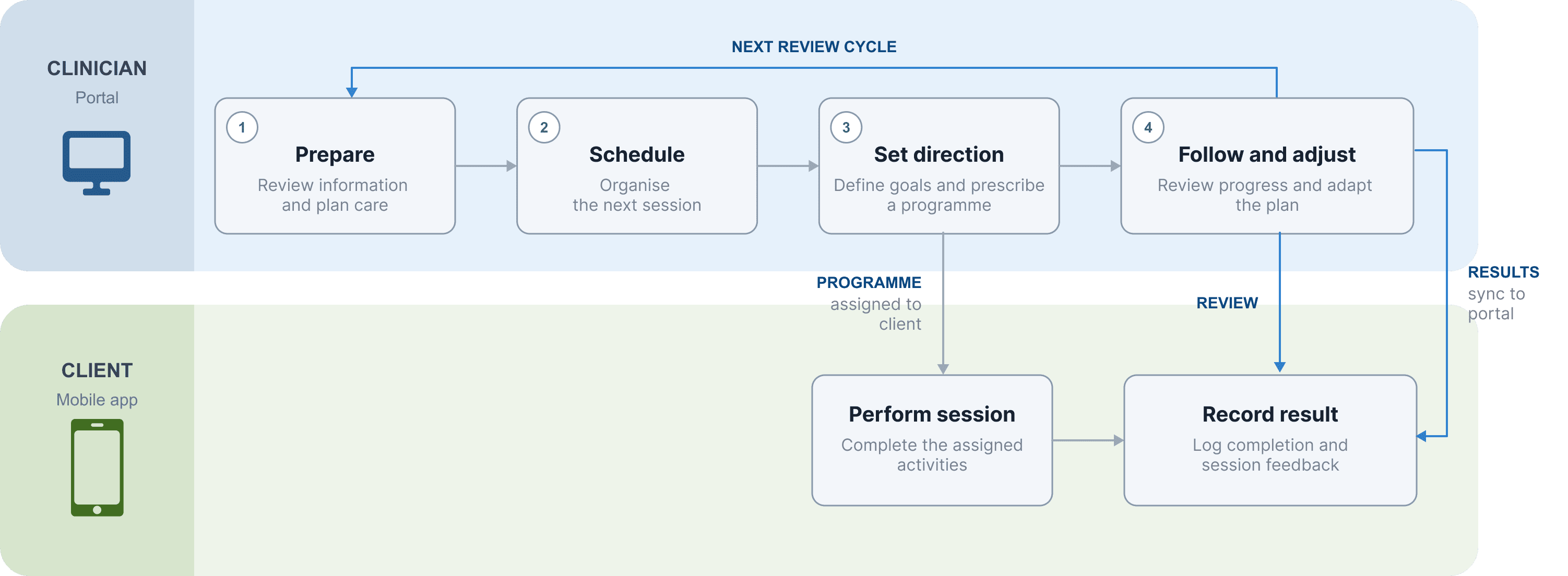
The clinical workspace supports a continuous treatment cycle:
physiotherapists prepare and schedule treatment, define goals
and review results, while clients follow their programmes and
record activity in the mobile app. Recorded results return
to the portal and inform further treatment decisions.
2. Design approach
The
product's initial scope was already established; the focus was on refining its existing
concept and improving the structure and usability.The overall product ecosystem was designed
around three
key objectives:
Support physiotherapists in their daily work by improving
clinical documentation, patient management and treatment coordination.
Deliver meaningful and distinctive value by extending the
software beyond its core functionality with additional features and use cases.
Maintain an independent mobile experience for individual users
who use the platform outside a patient–physiotherapist relationship, without
disrupting or competing with the ecosystem's primary clinical workflows.
Method
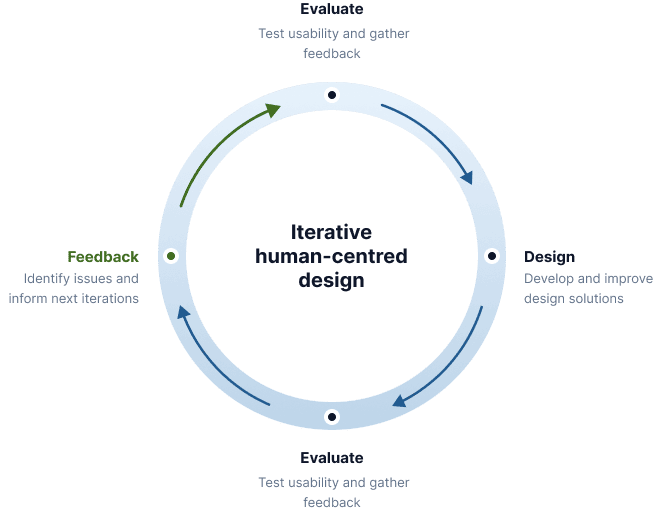
The work followed an iterative, human-centred approach, using research
to understand clinicians' context and usability testing to evaluate
design solutions. Insights and feedback from each stage informed
subsequent design decisions.
Understand the context
Explore clinicians' workflows, working methods and challenges
through interviews and usability tests.
Define user needs
Identify usability issues, clarify user needs and translate
research findings into practical design considerations.
Develop design solutions
Translate design considerations into interface structures,
workflows and interactions, refining existing functionality
where needed.
Evaluate and iterate
Test evolving designs with users, identify points of friction
and use feedback to guide further improvements.
The design process was supported by continuous user feedback throughout the project. We
regularly
conducted usability tests with users, held consultations with physiotherapists and carried out
in-depth interviews (IDIs) and surveys. These activities helped us understand users' needs and
routines, gather
feedback on the evolving software and evaluate design changes as the product developed.
3. Research synthesis and design direction
The research was conducted across multiple rounds of interviews,
consultations with physiotherapists and usability testing. These
activities provided insights into clinicians' workflows, needs and
expectations, while helping us identify recurring challenges in the
existing software. The findings were synthesised to establish a clearer
understanding of the users' perspective and inform the design
directions presented in this section.
Research objectives
The research aimed to understand how physiotherapists work with patients
and how the existing product could better support their everyday clinical
workflows. Through interviews, consultations and usability
testing, we sought to:
Understand physiotherapists' workflows, routines and working methods.
Identify usability issues and points of friction in the existing software.
Explore how the product's structure and functionality aligned with clinical practice.
Understand users' expectations and needs when managing patients, treatment plans and
clinical information.
Evaluate proposed changes and gather feedback on successive design iterations.
Research and synthesis
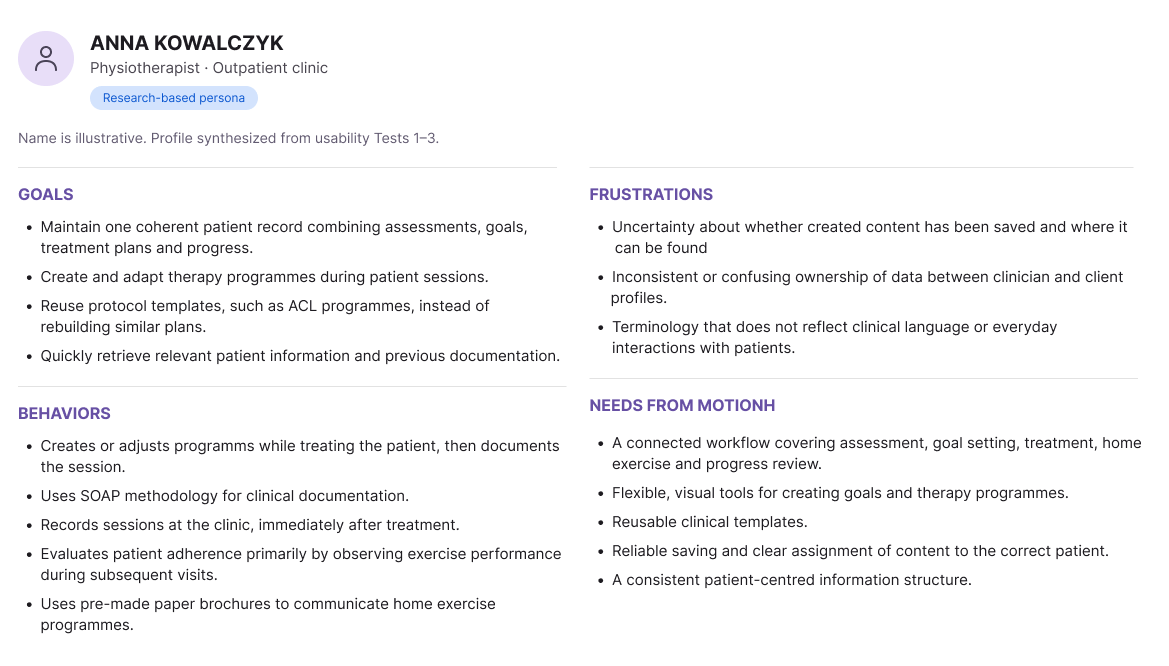
I synthesised findings from the first three research rounds into a
research-based persona. Rather than representing one specific individual,
it brings together relevant goals, behaviours and difficulties observed
during the research. I used it as a practical reference when evaluating
design decisions from the clinician's perspective.
From research to design
I translated the research insights into the following design directions.
Research insight
Design direction
Treatment can take shape during the session.
One participant described creating a programme while treating the
patient and documenting it afterwards. This highlighted the need
to support flexible, in-session work.
Support flexible programme creation.
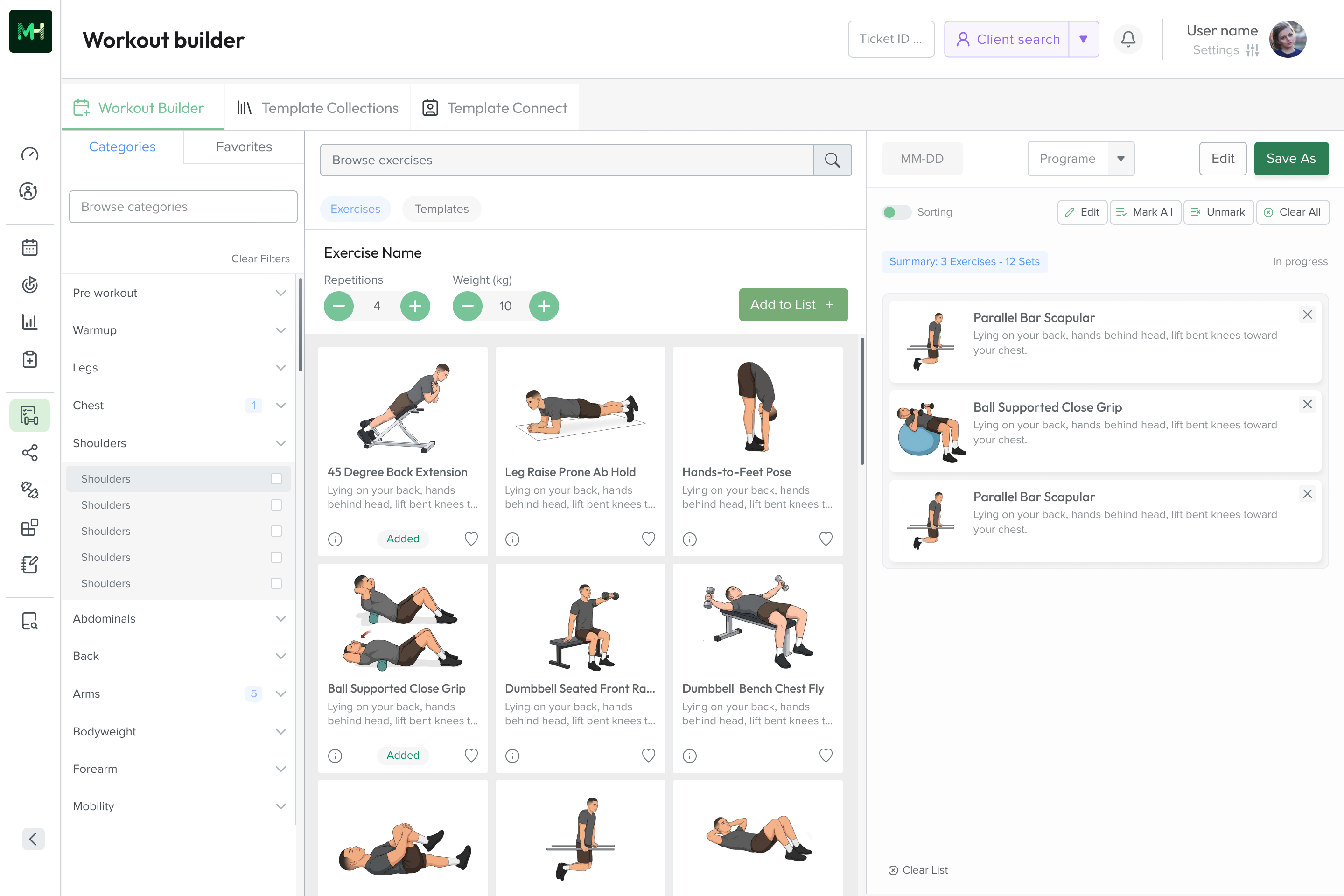
I brought exercise selection and programme assembly into one
working space, allowing clinicians to build and adjust treatment
programmes during a session. This is illustrated in the Workout Builder example.
Existing protocols are reused and adapted.
Physiotherapists may rely on established programme structures,
such as ACL rehabilitation protocols, rather than recreate similar
content for every patient.
Account for reuse and adaptation.
I considered reusable programme structures as a way to reduce
repeated work and allow treatment plans to be adapted to
individual patients.
Clinical information needs continuity.
Patient information, assessments, treatment plans and documentation
are connected parts of the same process. Research also exposed
uncertainty about where information was saved and how tools related
to one another.
Keep patient-related information connected.
I worked on organising the clinical workspace around related
stages of work, rather than treating every module as an
isolated destination.
Software structure should reflect clinical thinking.
Confusion around terms and relationships between features such as
Designer, Workout Builder, Templates and Plans indicated a gap
between the software's structure and clinicians' expectations.
Make the structure easier to understand.
I reviewed and refined navigation, feature relationships and
terminology as usability testing exposed points of confusion.
Key product design directions
Alongside these specific design responses, I worked on several broader
product directions that informed the further development of MotionH.
These reflected wider user needs and were also considered in light of
solutions identified through competitive analysis.
Expand reusable plans and connect them with Assessments
Extend plan creation with reusable structures linked to the
Assessments module, creating a more connected workflow
between clinical evaluation and programme planning.
Make long-term rehabilitation progress easier to understand
Introduce a clear visual representation of the rehabilitation
process, helping patients understand their progress and see
how different stages of recovery relate to one another.
Connect mobile Goals with the clinician software
Bring goals created in the mobile app into the clinician's
software, extending their use across both sides
of the MotionH platform.
Selected product changes
The following examples show how I translated research findings,
usability evaluations and design considerations into changes
across individual product modules.
Change status
What we observed
What I changed
Changed
Plan creation was unclear and overly complex. Users struggled
with the two-step process of creating a plan and then adding
exercises. (Usability tests 1 and 2)
I redesigned the Plan Builder around two panels: a library of
templates and the plan being created. I replaced input-based
selection with direct drag & drop interaction.
Changed
Users confused Workout Builder with Template Builder, creating
an unnecessary extra step in the workflow. (Usability test 2)
I replaced two separate save actions with a single Save As process,
allowing clinicians to choose whether to save a programme or a template.
Changed
The Assessment Catalog lacked a clear information hierarchy,
making clinical documents difficult to locate.
(Design judgment; usability test 3)
I restructured the catalog into a modular, browsable layout
with document categories reflecting physiotherapy work.
Changed
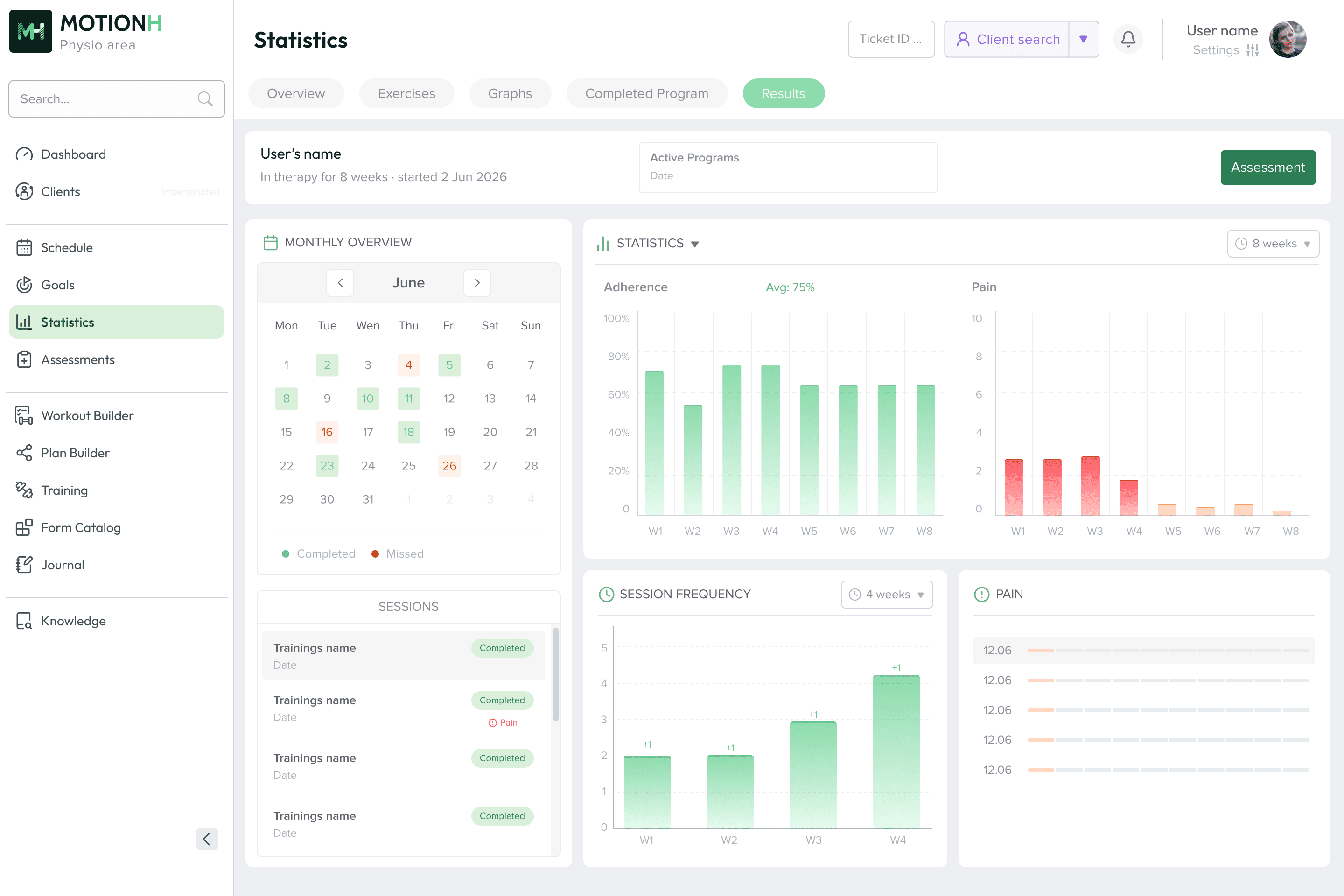
The existing statistics views did not reflect how physiotherapists
assess patient progress. Information was fragmented across
sections, and calendar dates did not match how clinicians
interpreted programme progress. (Research findings, Test 2)
I reorganised the Statistics module, grouping related views under
tabs, introducing patient context and restructuring data
presentation around programme weeks and clinical progress.
Changed
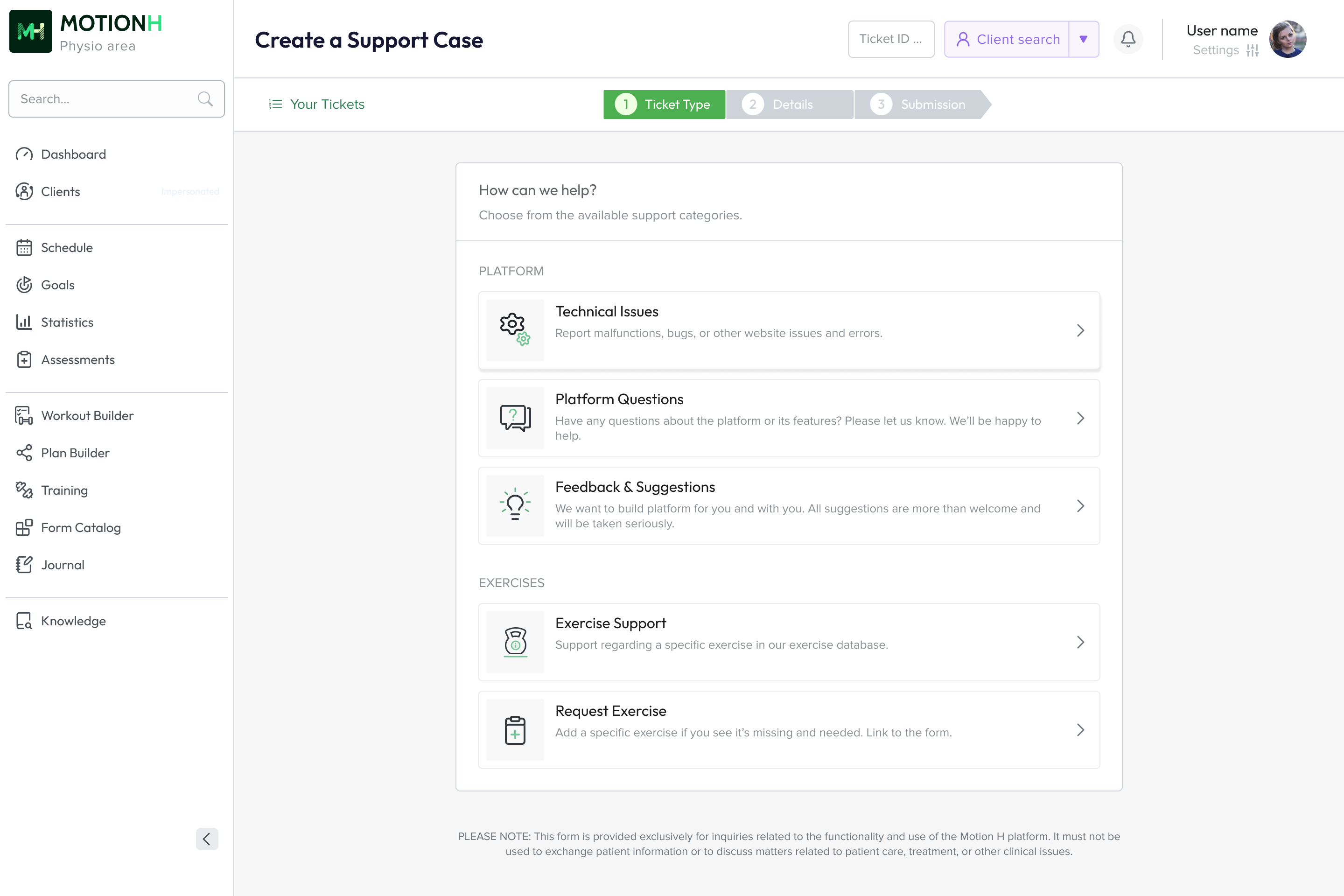
General support requests and requests to add exercises to the
library were handled through two separate channels, creating
unnecessary fragmentation. (Usability test 3)
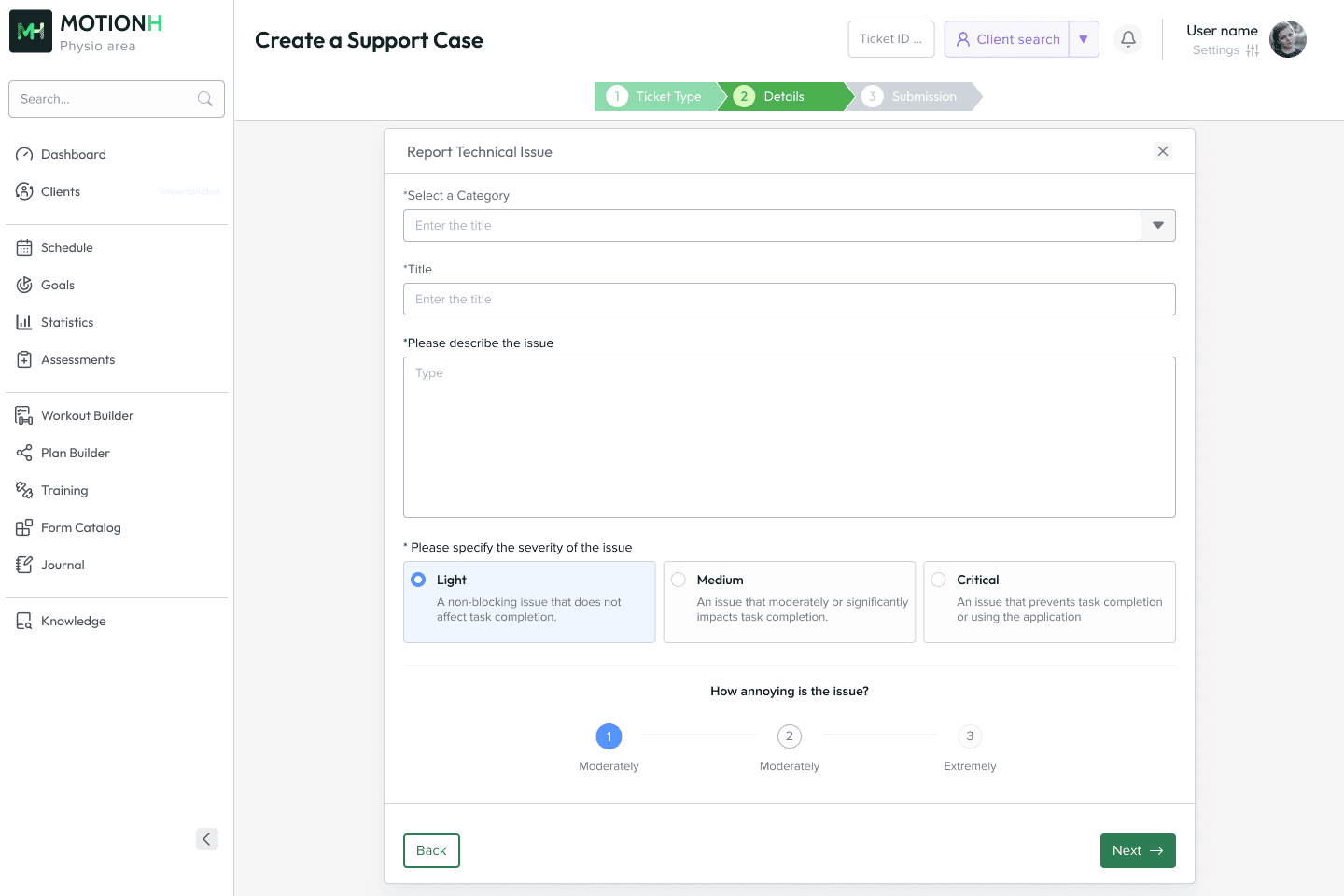
I consolidated both channels into a single ticket system,
organised by topic, and redesigned the submission process
as a sequence of manageable steps.
A broader set of design decisions and product changes is documented
in the Change Log.
5. Selected examples
The following examples illustrate selected parts of the project and the
type of design work involved. They cover different interfaces and tasks,
but are not intended to represent the full scope of the work. Additional
screens, interaction states and detailed workflows are available in the
extended case study.
Workout Builder: assembling a programme
The Workout Builder is used to translate a physiotherapist's treatment
decisions into structured exercise programmes for clients. It brings
together exercise selection, configuration of repetitions and sets, and
programme assembly. Programmes can be created individually or based on
reusable templates, which can be adapted to the needs of each client.
Given the nature of this task, our aim was to make the process as simple
and intuitive as possible.
The following are selected changes made to the Builder module. The remaining changes are
documented in the change log.
Selected changes
What we observed
What we did
Layout
The Builder lacked sufficient workspace for comfortable use.
Multiple panels and the persistent side navigation limited the
space available for the main task.
Introduced collapsible panels and a minimized side navigation,
allowing users to reclaim workspace and focus on the Builder.
Interaction
The exercise addition process needed clearer guidance,
particularly for users learning how to work with the Builder.
Introduced progressive enabling and clearer enabled and disabled
component states to guide users through the exercise addition process.
Information architecture
The existing exercise categorization did not sufficiently reflect
how physiotherapists think about and search for exercises.
Reworked the exercise categories to better align with
physiotherapists' mental models and ways of organizing exercises.
Usability
The arrangement of interface elements did not consistently
reflect the sequence of actions users followed when building a workout.
Redesigned and regrouped interface elements around the user's
workflow, creating a more coherent sequence of actions.
Functionality
Creating similar workout structures repeatedly could involve
unnecessary duplication of work.
Added reusable templates to the Builder, allowing users to
reuse existing workout structures instead of creating them from scratch.
Statistics: monitoring patient progress
The Statistics module provides an overview of an individual client's
engagement with their exercise programme and their progress over time.
It brings together training adherence, session frequency and reported
pain levels, allowing physiotherapists to monitor completed and missed
sessions, identify changes in activity and review the client's response
to the ongoing programme. The information is presented across different
time periods to support the assessment of treatment progress and inform
further decisions.
Support Tickets: managing platform and exercise requests
The Support Tickets module provides a structured way for users to
report technical issues, ask questions about the platform, submit
feedback and request support related to specific exercises. These
categories help distinguish different types of enquiries and direct
them to the appropriate process. I designed the ticket submission
flow, including its structure, interaction logic and validation
mechanism for exercise requests, which checks whether the requested
exercise is already available in the library. I also designed the
administrative workflows for managing incoming tickets and exercise
requests.
Allow users to request exercises missing from the library
Consultations with physiotherapists highlighted the need to
request exercises that were not yet available in the exercise
library.
The full case study is available in a password-protected section due to confidentiality restrictions.